
Text Fixer for Homestuck & Vast Error
Overview
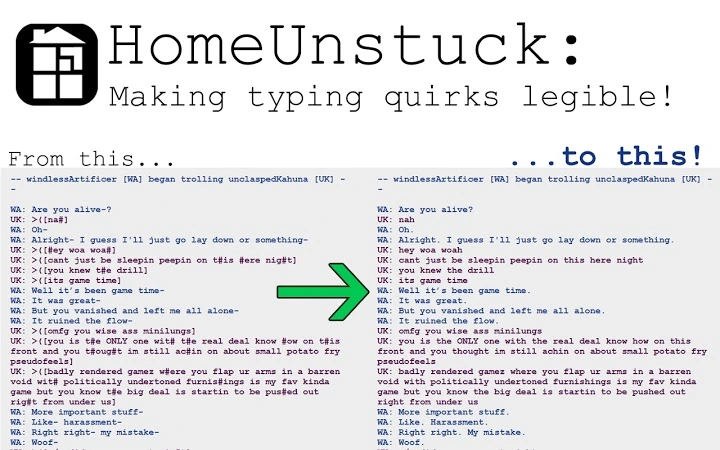
The Text Fixer for Homestuck & Vast Error is a specialized browser extension designed to enhance readability for fans of the expansive webcomic Homestuck and its official spinoff, Vast Error. Built to address the unique formatting challenges of the series, the tool replaces non-standard text patterns—such as leetspeak, inconsistent capitalization, and stylized character typing—with conventional English spelling and grammar. This significantly reduces cognitive load for readers, particularly those with reading-related disabilities or those new to the complex narrative style.
The extension is tailored for enthusiasts of long-form digital storytelling who engage with content presented in a faux chat log format. Characters in Homestuck and Vast Error communicate using highly individualized typing quirks, which can hinder comprehension. The tool dynamically interprets these patterns in real time, making dialogue more accessible without altering the original intent or tone of the narrative.
It is especially beneficial for readers who want to enjoy the full depth of the story without being slowed down by deciphering stylized text. The extension supports both the official Vast Error site and MS Paint Fan Adventures, ensuring broad compatibility with fan-created content. While the developer has not provided additional background, the tool’s focused functionality suggests a community-driven development effort rooted in accessibility and fan engagement.
Key Features & Capabilities
- Context-Aware Text Replacement – Automatically converts stylized text patterns into standard English, adjusting for each character’s unique voice while preserving narrative authenticity.
- Character-Specific Support – Recognizes and corrects text for major characters including Albion, Arcjec, Dismas, Ellsee, Laivan, Murrit, Occeus, Sovara, and Taz, as well as minor characters like Hamifi, Sestro, Rodere, Vellia, Guardianspirit, and Snake Denizens.
- Toggleable Correction per Character – Users can enable or disable text correction for individual characters via the extension’s options page, allowing for personalized reading experiences.
- Customizable Chat Handle Recognition – Allows users to update the list of chat handles associated with each character, ensuring continued functionality even if identifiers change in future comic updates.
- Multi-Platform Compatibility – Functions on the official Vast Error site and MS Paint Fan Adventures, providing consistent support across key fan content hubs.
These features are particularly useful for readers who find the original text difficult to parse due to its non-standard formatting. For example, a reader encountering a passage where a character uses heavy leetspeak (e.g., "R3P74C1NG NUMB3R77 W17H L3773R5") will see it rendered as "REPLACING NUMBERS WITH LETTERS BUT INCONSISTENTLY" in real time. This allows for smoother reading flow and improved comprehension without requiring manual decoding.
User Interface, Workflow & Performance
The extension integrates seamlessly into the browser environment with a minimal interface. Users access its settings through the browser’s extension management panel, where they can configure character-specific correction rules and toggle functionality on a per-character basis. The UI is straightforward, relying on checkboxes and input fields to manage preferences, which supports efficient workflow customization.
Operation is automatic and non-intrusive. Once installed, the tool processes text in real time as pages load, requiring no manual intervention. There is no visible overlay or disruptive pop-up, ensuring the reading experience remains uninterrupted. The developer did not specify resource usage details, but based on the extension’s size (2.1 MB) and focused scope, it is expected to operate efficiently without significant impact on browser performance.
Stability appears consistent with typical lightweight browser extensions. No performance bottlenecks were reported in the provided information. The tool functions reliably across the supported platforms, maintaining accuracy in text conversion without errors. Users can expect a stable experience during extended reading sessions, though exact CPU or RAM behavior was not disclosed.
Compatibility & System Requirements
The Text Fixer for Homestuck & Vast Error is compatible with Windows, Mac, and Linux operating systems, making it accessible to a broad audience of fans across different computing environments. It is designed for use within modern web browsers, though specific browser versions were not listed.
The installation size is 2.1 MB, which is minimal for a browser extension. This small footprint suggests low storage impact and fast installation times. The developer did not provide additional system requirements, including minimum RAM, CPU, or disk space. As such, exact hardware demands remain unspecified.
Compatibility with the official Vast Error site and MS Paint Fan Adventures is confirmed. Support for other Homestuck-related fan sites or future spinoffs was not mentioned. Users should verify functionality on specific platforms, as behavior may vary depending on site-specific scripting or content delivery methods.
Pros and Cons
Pros
- Significantly improves readability of stylized text in Homestuck and Vast Error
- Supports a wide range of major and minor characters with individualized correction rules
- Allows granular control over which characters have text correction enabled
- Customizable chat handle recognition for future-proofing against updates
- Lightweight design with minimal impact on system resources
Cons
- Currently limited to Vast Error; no support for the main Homestuck comic
- Exact browser compatibility details not provided
- Performance resource usage not specified
- Developer background and support channels not disclosed
- Limited to text replacement—no additional reading enhancements or accessibility features
FAQ Section
Is the extension free to use?
Yes, the Text Fixer for Homestuck & Vast Error is completely free. No payment or subscription is required for full access to its features.
Which platforms does it support?
The extension is compatible with Windows, Mac, and Linux operating systems. It runs within supported web browsers, though specific browser versions were not listed.
Does it work on all Homestuck fan sites?
It is confirmed to work on the official Vast Error site and MS Paint Fan Adventures. Support for other fan sites was not specified and may vary.
Can I customize how characters are identified?
Yes, users can update the list of chat handles associated with each character in the extension’s options page. This helps maintain functionality if identifiers change in future comic updates.
Is the extension secure to install?
As a browser extension, it operates within the browser’s security sandbox. While no external data is collected, users should only install extensions from trusted sources. The developer has not provided public contact or privacy policy details.
Final Thoughts & CTA
The Text Fixer for Homestuck & Vast Error stands out as a focused, effective solution for fans struggling with the complex text formatting of the Vast Error spinoff. Its context-aware correction, character-specific controls, and customizable settings make it a valuable tool for improving accessibility and reading efficiency. While limited in scope to a single fan comic, its precision and lightweight design deliver a meaningful enhancement for its target audience.
Readers who value clarity, consistency, and ease of access in long-form digital narratives will benefit most from this tool. It bridges a critical gap for those who want to engage with the story without being hindered by stylized text.
Download Text Fixer for Homestuck & Vast Error now







